Practical 6 :- Practical based on web application development using JSP
Create a Telephone directory using JSP and store all the information within adatabase, so that later could be retrieved as per the requirement. Make your own assumptions.
Code :- Index.jsp
<%--
Document : index
Created on : Mar 22, 2021, 12:25:31 PM
Author	: VIKRAM
Create a Telephone directory using JSP and store all the information within a database, so that later could be retrieved as per the requirement. Make your own assumptions.
--%>

<%@page contentType="text/html" pageEncoding="UTF-8"%>
<!DOCTYPE html>
<html>
<head>
<meta http-equiv="Content-Type" content="text/html; charset=UTF-8">
<title>Practical 6-1</title>
</head>
<body>
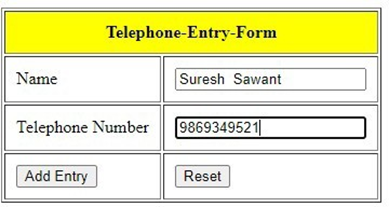
<form action="Process.jsp">
<table align="center">
<tr align="center">
<td style="color:red;padding:10px">${param.message}</td>
</tr>
</table>
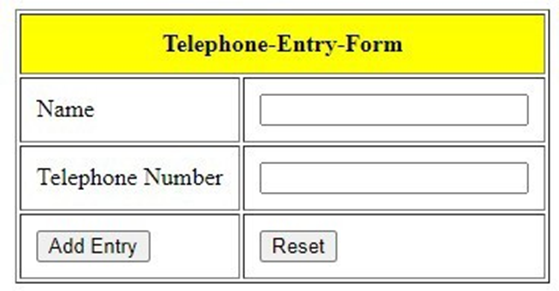
<table border="1" align="center" cellpadding="10px">
<thead>
<tr align="center">
<th colspan="2" style="background-color: yellow; padding: 10px">Telephone-Entry-
Form</th>

</tr>

</thead>
<tbody>
<tr>
<td>Name</td>
<td><input type="text" name="txtName" value="" /></td>
</tr>
<tr>
<td>Telephone Number</td>
<td><input type="text" name="txtTel" value="" /></td>

</tr>
<tr>
<td><input type="submit" value="Add Entry" /></td>
<td><input type="reset" value="Reset" /></td>
</tr>
</tbody>
</table>

</form>
</body>
</html>
Output
Code :- Process.jsp
<%--
Document : Process
Created on : Mar 22, 2021, 11:07:53 AM
Author	: VIKRAM
--%>

<%@page import="java.sql.ResultSet"%>
<%@page import="java.sql.SQLException"%>
<%@page import="java.sql.DriverManager"%>
<%@page import="java.sql.Statement"%>
<%@page import="java.sql.PreparedStatement"%>
<%@page import="java.sql.Connection"%>
<%@page contentType="text/html" pageEncoding="UTF-8"%>


<!DOCTYPE html>
<html>
<head>
<meta http-equiv="Content-Type" content="text/html; charset=UTF-8">
<title>Process</title>
</head>
<body>
<%
String url="jdbc:mysql://localhost:3306/studentdb?zeroDateTimeBehavior=convertToNull"; String user="root";
String password="";
String uname=request.getParameter("txtName"); String tel=request.getParameter("txtTel"); Connection conn;
PreparedStatement ps; Statement st;
ResultSet rs;
// connection Initialization Class.forName("com.mysql.jdbc.Driver"); conn=DriverManager.getConnection(url, user, password);
try
{

//checking the record already exist in database or not st=conn.createStatement();
rs=st.executeQuery("select * from teldir"); while(rs.next())
{
if(rs.getString(2).equals(uname)&& rs.getString(3).equals(tel))
{%>
<jsp:forward page="index.jsp">
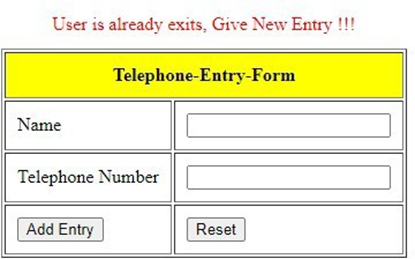
<jsp:param name="message" value="User is already exits, Give New Entry !!!" />
</jsp:forward>
<%
}
}
//inserting record in database
String sql="insert into teldir(name,telephone) values(?,?)"; ps=conn.prepareStatement(sql);
ps.setString(1,uname); ps.setString(2,tel); ps.executeUpdate();


conn.close();
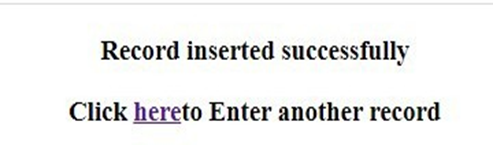
out.println("<h3 align='center'>"); out.println("Record inserted successfully"); out.println("</h3>");
out.println("<h3 align='center'>");
out.println("Click "+"<a href='index.jsp'>here</a>"+"to Enter another record"); out.println("</h3>");

}
catch(SQLException e)
{
e.printStackTrace();
}
%>
</body>
</html>
Output
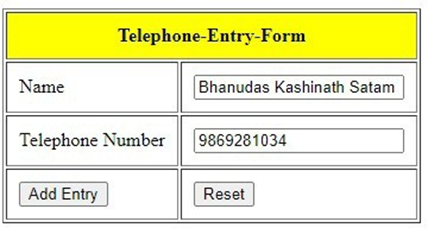
If user is already exist

New Entry
Write a JSP page to display the Registration form (Make your own assumptions)
Code Index.Jsp
<%--
Document : index
Created on : Mar 19, 2021, 12:54:11 PM Author	: VIKRAM
Write a JSP page to display the Registration form
--%>

<%@page contentType="text/html" pageEncoding="UTF-8"%>
<!DOCTYPE html>
<html>
<head>
<meta http-equiv="Content-Type" content="text/html; charset=UTF-8">
<title>Registration Form </title>
<link rel="stylesheet" href="https://code.jquery.com/ui/1.12.1/themes/base/jquery-ui.css">
<script src="https://code.jquery.com/jquery-1.12.4.js"></script>
<script src="https://code.jquery.com/ui/1.12.1/jquery-ui.js"></script>
<script>
$( function() {
$.datepicker.setDefaults({ onClose:function(date, inst){
$("#selectedDtaeVal").html(date);
}
});
$( "#datepicker" ).datepicker();});
</script>
</head>
<body>
<form action="process.jsp">
<table border="1" cellpadding="10px" align="center">
<thead>
<tr>
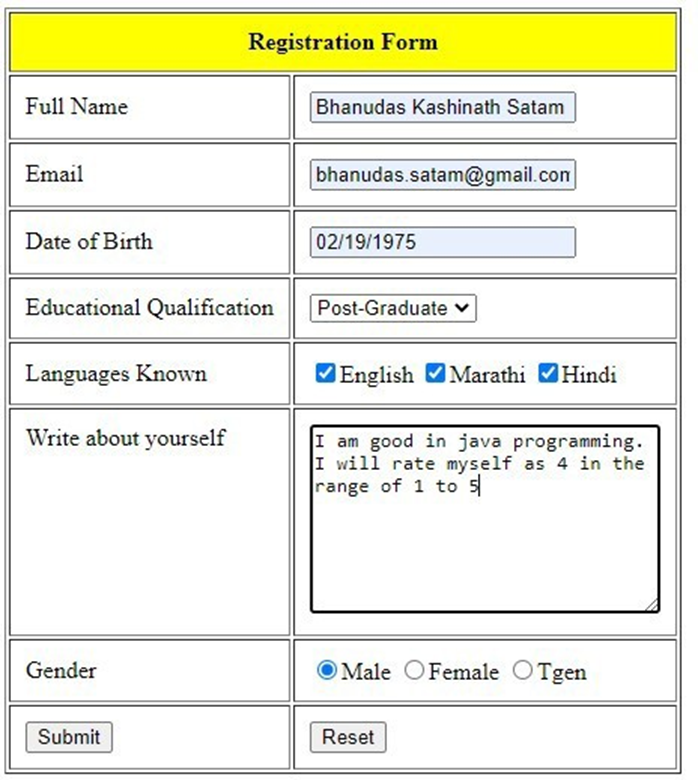
<th colspan="2" style="background-color: yellow" padding="10px">Registration Form</th>
</tr>
</thead>
<tbody>
<tr>
<td>Full Name</td>
<td><input type="text" name="txtName" value="" /></td>
</tr>
<tr>
<td>Email</td>
<td><input type="text" name="txtEmail" value="" /></td>
</tr>
<tr>
<td>Date of Birth</td>
<td><input type="text" name="txtbdate" id="datepicker"></td>
</tr>
<tr>
<td>Educational Qualification</td>
<td><select name="opt-qualify">
<option>HSC</option>
<option>Diploma</option>
<option>Graduate</option>
<option>Post-Graduate</option>
</select></td>
</tr>
<tr>
<td>Languages Known</td>
<td><input type="checkbox" name="lk" value="English"/>English
<input type="checkbox" name="lk" value="Marathi" />Marathi
<input type="checkbox" name="lk" value="Hindi" />Hindi
</td>
</tr>
<tr>
<td valign="top">Write about yourself</td>
<td><textarea name="about" rows="8" cols="30" >
</textarea></td>
</tr>
<tr>
<td>Gender </td>
<td><input type="radio" name="gen" value="Male" />Male
<input type="radio" name="gen" value="Female" />Female
<input type="radio" name="gen" value="Tgen" />Tgen</td>
</tr>
<tr>
<td><input type="submit" value="Submit" /></td>
<td><input type="reset" value="Reset" /></td>
</tr>
</tbody>
</table>

</form>

</body>
</html>
Output
Code :- Process.JSP
<%--
Document : process
Created on : Mar 19, 2021, 2:16:48 PM Author	: VIKRAM
--%>

<%@page import="java.util.Arrays"%>
<%@page import="java.util.List"%>
<%@page contentType="text/html" pageEncoding="UTF-8"%>

<!DOCTYPE html>
<html>
<head>
<meta http-equiv="Content-Type" content="text/html; charset=UTF-8">
<title>Practical6-2</title>
</head>
<body>
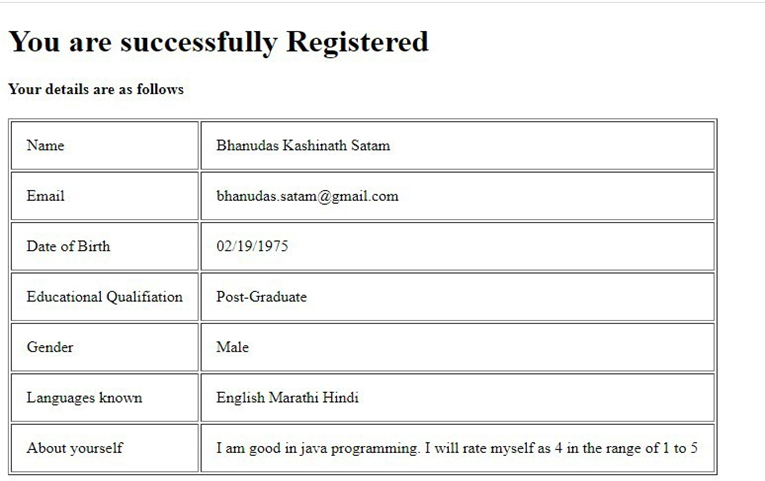
<h1>You are successfully Registered </h1>
<h4>Your details are as follows </h4>
<% String name,email,dob,equalify,lang,yourself,gen; name=request.getParameter("txtName"); email=request.getParameter("txtEmail"); dob=request.getParameter("txtbdate"); equalify=request.getParameter("opt-qualify"); lang=request.getParameter("English"); yourself=request.getParameter("about"); gen=request.getParameter("gen");

String [] lknown=request.getParameterValues("lk");
List list=Arrays.asList(lknown); request.setAttribute("lknown",list);
List<String> lk =  (List<String>)request.getAttribute("lknown"); out.println("<table border='1' cellpadding='15px'>");

out.print("<tr>");
out.print("<td>");
out.print("Name");
out.print("</td>");
out.print("<td>"); out.print(name);


out.print("</td>");
out.print("</tr>");

out.print("<tr>");
out.print("<td>");
out.print("Email");
out.print("</td>");
out.print("<td>"); out.print(email); out.print("</td>");
out.print("</tr>");

out.print("<tr>");
out.print("<td>"); out.print("Date of Birth"); out.print("</td>");
out.print("<td>"); out.print(dob); out.print("</td>");
out.print("</tr>");

out.println("<tr>");
out.println("<td>");
 out.println("Educational Qualifiation"); out.println("</td>");
out.println("<td>");
 out.println(equalify);
out.println("</td>");
out.println("</tr>");

out.println("<tr>"); out.println("<td>"); out.println("Gender"); out.println("</td>"); out.println("<td>"); out.println(gen); out.println("</td>"); out.println("</tr>");

out.println("<tr>"); out.println("<td>"); out.println("Languages known");


out.println("</td>"); out.println("<td>"); for(String item:lk)
{
out.println(item);
}
out.println("</td>"); out.println("</tr>");

out.println("<tr>"); out.println("<td>"); out.println("About yourself"); out.println("</td>"); out.println("<td>"); out.println(yourself); out.println("</td>"); out.println("</tr>"); out.println("</table>");
%>
</body>
</html>
Output
Write a JSP program to add, delete and display the records from StudentMaster (RollNo, Name, Semester, Course) table
Code :- add.jsp
<%--
Document : index
Created on : Mar 18, 2021, 8:49:16 AM Author	: VIKRAM
--%>

<%@page contentType="text/html" pageEncoding="UTF-8"%>
<!DOCTYPE html>
<html>
<head>
<meta http-equiv="Content-Type" content="text/html; charset=UTF-8">
<title>Index page</title>
<style>
#content
{
margin-top:10px;
}
#tablehead
{
background-color: yellow; padding:10px;
}
</style>
</head>
<body>

<%@include file="header.jsp" %>
<div id="content">
<h2 align="center">Adding Record </h2>
<table align="center">
<tr align="center" style="color:blue">
<td>${param.message}</td>
</tr>
</table>
<form action="addrecord.jsp">
<table border="1" align="center" cellpadding="10px">
<thead>
<tr id='tablehead'>
<th colspan="2">Student Master Form</th>
</tr>
</thead>
<tbody>

<tr>
<td>Name</td>
<td><input type="text" name="txtname" value="" /></td>
</tr>
<tr>
<td>Semester</td>
<td><select name="optsem">
<option>Sem I</option>
<option>Sem II</option>
<option>Sem III</option>
<option>Sem IV</option>
</select></td>
</tr>
<tr>
<td>Course</td>
<td><select name="optcourse">
<option>MCA</option>
<option>M.Sc[Comp.Sc]</option>
<option>M.Sc[I.T.]</option>
</select></td>
</tr>
<tr>
<td><input type="submit" value="Add Record" /></td>
<td><input type="reset" value="Reset" /></td>
</tr>
</tbody>
</table>

</form>
<%@include file="footer.jsp" %>
</body>
</html>
Code :- Addrecord.jsp
<%--
Document : addrecord
Created on : Mar 18, 2021, 8:57:40 AM


Author	: VIKRAM
--%>

<%@page import="java.sql.ResultSetMetaData"%>
<%@page import="java.sql.Statement"%>
<%@page import="java.sql.DriverManager"%>
<%@page import="java.sql.PreparedStatement"%>
<%@page import="java.sql.Connection"%>
<%@page import="java.sql.ResultSet"%>
<%@page contentType="text/html" pageEncoding="UTF-8"%>
<!DOCTYPE html>
<html>
<head>
<meta http-equiv="Content-Type" content="text/html; charset=UTF-8">
<title>Add Record process</title>
</head>
<body>
<%
String sname=request.getParameter("txtname");
String sem=request.getParameter("optsem");
String course=request.getParameter("optcourse"); Connection conn;
PreparedStatement ps;
String url="jdbc:mysql://localhost:3306/studentdb"; String user="root";
String password="";
//step 1 try
{
Class.forName("com.mysql.jdbc.Driver"); conn=DriverManager.getConnection(url, user, password);
String sql="insert into student(sname,semester,course)value(?,?,?)";

ps=conn.prepareStatement(sql); ps.setString(1, sname);
ps.setString(2, sem);
ps.setString(3, course); ps.executeUpdate(); conn.close();

}catch(ClassNotFoundException e)
{

e.printStackTrace();
}catch(Exception e)
{
e.printStackTrace(); }
%>
<jsp:forward page="add.jsp">
<jsp:param name="message" value="record inserted successfully" />
</jsp:forward>
</body>
</html>
Output
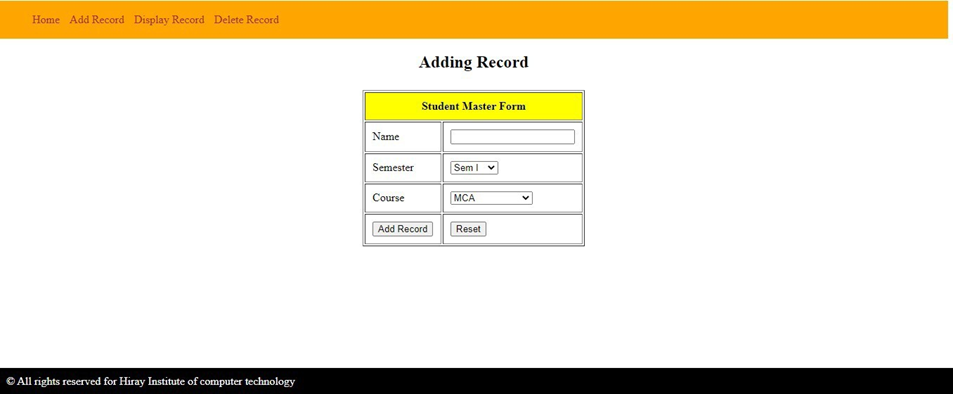
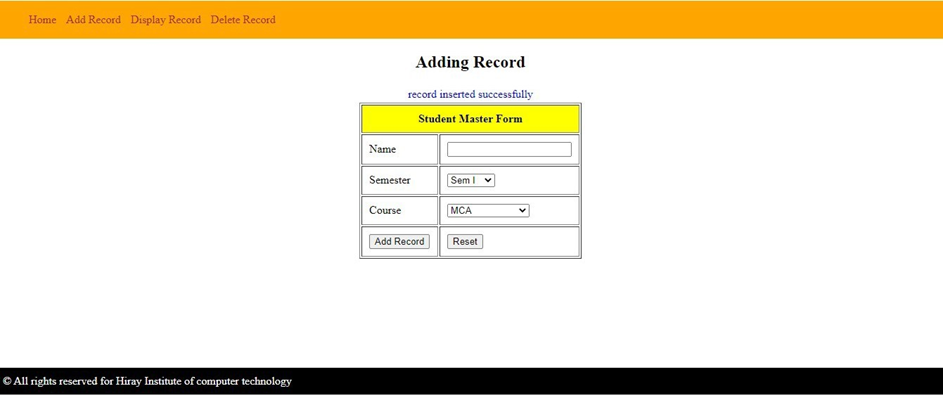
Code :- display.jsp
<%--
Document : index
Created on : Mar 18, 2021, 8:49:16 AM Author	: VIKRAM
--%>


<%@page import="java.sql.ResultSetMetaData"%>
<%@page import="java.sql.Statement"%>
<%@page import="java.sql.SQLException"%>
<%@page import="java.sql.ResultSet"%>
<%@page import="java.sql.PreparedStatement"%>
<%@page import="java.sql.DriverManager"%>
<%@page import="java.sql.Connection"%>
<%@page contentType="text/html" pageEncoding="UTF-8"%>
<!DOCTYPE html>
<html>
<head>
<meta http-equiv="Content-Type" content="text/html; charset=UTF-8">
<title>Index page</title>
<style>
#content
{
margin-top:10px;
}
.tablehead
{
background-color: yellow; padding:10px;
}

</style>
</head>
<body>
<%


String  rollno=request.getParameter("optrollno");
Connection conn;
ResultSetMetaData rsmd; ResultSet rs1=null,rs2=null; Statement st; PreparedStatement ps;


String rn=null,nam=null,sam=null,co=null;
 try
{
conn=DriverManager.getConnection("jdbc:mysql://localhost:3306/studentdb","root","");
st=conn.createStatement();
rs1=st.executeQuery("select rollno from student"); ps=conn.prepareStatement("select * from student where rollno=?");
ps.setInt(1, Integer.parseInt(rollno));
rs2=ps.executeQuery(); rs2.next(); rn=rs2.getString(1); nam=rs2.getString(2); sam=rs2.getString(3); co=rs2.getString(4);

}catch(NumberFormatException e)
{
e.printStackTrace();
}
catch(SQLException e)
{
e.printStackTrace();
}
%>
<%@include file="header.jsp" %>
<div id="content">
<h4 align="center">Selecting Record </h4>
<form action="display.jsp" name="myform">
<table border="1" align="center" cellpadding="10px">
<thead>
<tr class='tablehead'>
<th colspan="2">Display Record</th>

</tr>
</thead>
<tbody>
<tr>
<td>Choose Rollno</td>
<td><select name="optrollno" onchange="document.myform.submit()">
<%
rsmd=rs1.getMetaData();
int tcol=rsmd.getColumnCount();
out.println("<option>"); out.println("Select Rollno"); out.println("</option>"); while(rs1.next())
{
out.println("<option>"); out.println(rs1.getString(1)); out.println("</option>");
}
%>
</select></td>
</tr>

</tbody>
</table>
<br>

<div id="output">
<table border="1" align="center" cellpadding="10px">
<thead>
<tr>
<th colspan="4" align="center" class="tablehead">Record </th>
</tr>
</thead>
<tbody>
<tr>
<th>Roll No</th>
<th>Name</th>
<th>Semester</th>
<th>Course</th>
</tr>
<tr>
<td><%= rn%></td>
<td><%= nam%></td>
<td><%= sam%></td>
<td><%= co%></td>
</tr>
</tbody>
</table>

</div>
</form>


<%@include file="footer.jsp" %>
</body>
</html>
Output
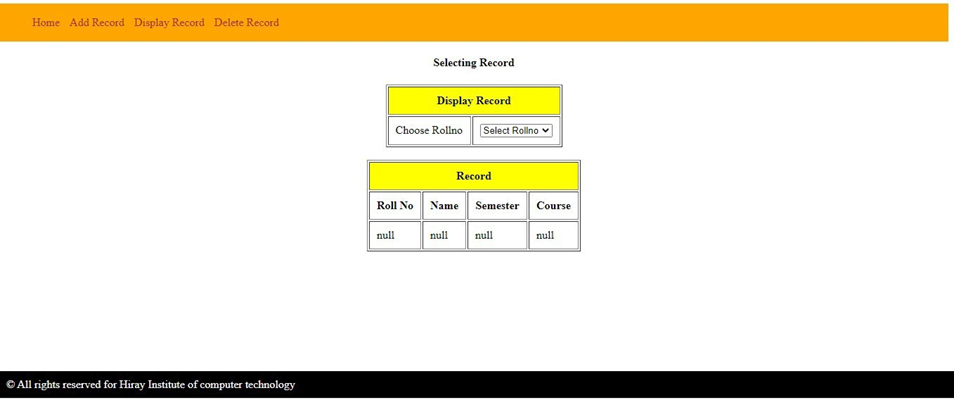
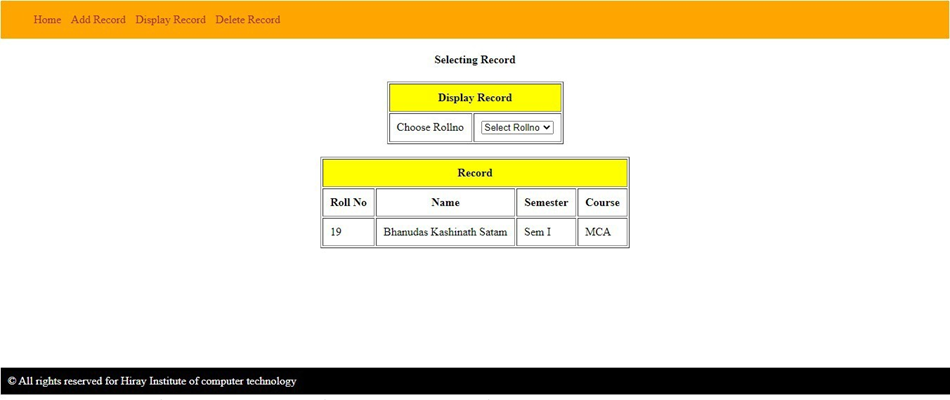
Code :- Delete.jsp
<%--
Document : index
Created on : Mar 18, 2021, 8:49:16 AM Author	: VIKRAM
--%>

<%@page import="java.sql.SQLException"%>
<%@page import="java.sql.DriverManager"%>


<%@page import="java.sql.Statement"%>
<%@page import="java.sql.ResultSet"%>
<%@page import="java.sql.Connection"%>
<%@page import="java.sql.ResultSetMetaData"%>
<%@page contentType="text/html" pageEncoding="UTF-8"%>
<!DOCTYPE html>
<html>
<head>
<meta http-equiv="Content-Type" content="text/html; charset=UTF-8">
<title>Index page</title>
<style>
#content
{
margin-top:10px;
}
.tablehead
{
background-color: yellow; padding:10px;
}

</style>
</head>
<body>
<%


String rollno=request.getParameter("optrollno"); Connection conn;
ResultSetMetaData rsmd;
ResultSet rs=null; Statement st;

try
{
conn=DriverManager.getConnection("jdbc:mysql://localhost:3306/studentdb","root","");
st=conn.createStatement();
rs=st.executeQuery("select rollno from student");
}catch(NumberFormatException e)
{

e.printStackTrace();
}
catch(SQLException e)
{
e.printStackTrace();


}
%>
<%@include file="header.jsp" %>
<div id="content">
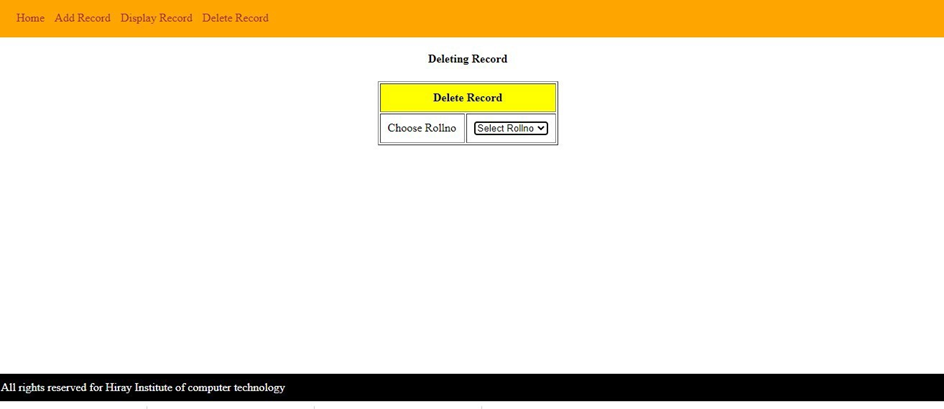
<h4 align="center">Deleting Record </h4>
<form action="deleterecord.jsp" name="myform">
<table border="1" align="center" cellpadding="10px">
<thead>
<tr class='tablehead'>
<th colspan="2">Delete Record</th>

</tr>
</thead>
<tbody>
<tr>
<td>Choose Rollno</td>
<td><select name="optrollno" onchange="document.myform.submit();">
<%
rsmd=rs.getMetaData();
int tcol=rsmd.getColumnCount(); out.println("<option>"); out.println("Select Rollno"); out.println("</option>"); while(rs.next())
{
out.println("<option>"); out.println(rs.getString(1)); out.println("</option>");
}
%>
</select></td>
</tr>

</tbody>
</table>
<table align="center">
<tr>
<td colspan="2">${param.message}</td>
</tr>
</table>
<%@include file="footer.jsp" %>
</body>

</html>
Code :- Deleterecord.jsp
<%--
Document : deleterecord
Created on : Mar 18, 2021, 9:19:27 AM Author	: VIKRAM
--%>

<%@page import="java.sql.SQLException"%>
<%@page import="java.sql.DriverManager"%>
<%@page import="java.sql.PreparedStatement"%>
<%@page import="java.sql.ResultSet"%>
<%@page import="java.sql.Connection"%>
<%@page import="java.sql.ResultSetMetaData"%>
<%@page contentType="text/html" pageEncoding="UTF-8"%>
<!DOCTYPE html>
<html>
<head>
<meta http-equiv="Content-Type" content="text/html; charset=UTF-8">
<title>JSP Page</title>
</head>
<body>
<%
String rollno=request.getParameter("optrollno"); Connection conn;
PreparedStatement ps;

try
{
conn=DriverManager.getConnection("jdbc:mysql://localhost:3306/studentdb","root","");
ps=conn.prepareStatement("delete from student where rollno = ?");
ps.setInt(1, Integer.parseInt(rollno)); ps.executeUpdate();
conn.commit(); conn.close();
}catch(NumberFormatException e)
{
e.printStackTrace();
}
catch(SQLException e)
{
e.printStackTrace();
}

%>
<jsp:forward page="delete.jsp">
<jsp:param name="message" value="Records Deleted successfully"/>
</jsp:forward>
</body>
</html>
Output
Design loan calculator using JSP which accepts Period of Time (in years) and Principal Loan Amount. Display the payment amount for each loan and then list the loan balance and interest paid for each payment over the term of the loan for the following time period and interest rate:
a. 1 to 7 year at 5.35%
b. 8 to 15 year at 5.5%
c. 16 to 30 year at 5.75%
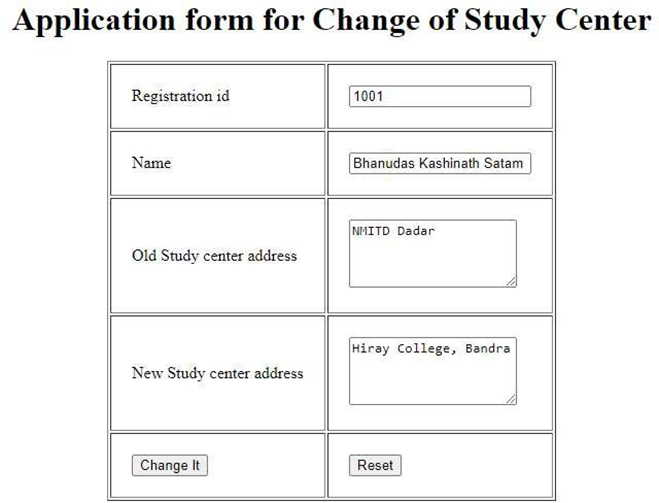
Write a program using JSP that displays a webpage consisting Application form for change of Study Center which can be filled by any student who wants to change his/her study center. Make necessary assumptions
Code :- Index.jsp
<%--
Document : index
Created on : Mar 23, 2021, 7:31:15 AM Author	: VIKRAM
Write a program using JSP that displays a webpage consisting Application form for change of Study Center which can be filled by any student who wants to change his/her study center.
Make necessary assumptions
--%>

<%@page contentType="text/html" pageEncoding="UTF-8"%>
<!DOCTYPE html>
<html>
<head>
<meta http-equiv="Content-Type" content="text/html; charset=UTF-8">
<title>Practical 6-5</title>
</head>
<body>
<h1 align="Center">Application form for Change of Study Center</h1>
<form action="Process.jsp">
<table border="1" align="center" cellpadding="20px">
<tbody>
<tr>
<td>Registration id</td>
<td><input type="text" name="txtRegid" value="" /></td>
</tr>
<tr>
<td>Name</td>
<td><input type="text" name="txtName" value="" /></td>
</tr>
<tr>
<td>Old Study center address</td>
<td><textarea name="txtOldaddress" rows="4" cols="20">
</textarea></td>
</tr>
<tr>
<td>New Study center address</td>
<td><textarea name="txtNewaddress" rows="4" cols="20">
</textarea></td>
</tr>
<tr>
<td><input type="submit" value="Change It" /></td>
<td><input type="reset" value="Reset" /></td>
</tr>
</tbody>
</table>

</form>
</body>
</html>
Code :- Process.jsp
<%--
Document : Process
Created on : Mar 23, 2021, 7:36:34 AM Author	: VIKRAM
--%>

<%@page contentType="text/html" pageEncoding="UTF-8"%>
<!DOCTYPE html>
<html>
<head>
<meta http-equiv="Content-Type" content="text/html; charset=UTF-8">
<title>JSP Page</title>
</head>
<body>
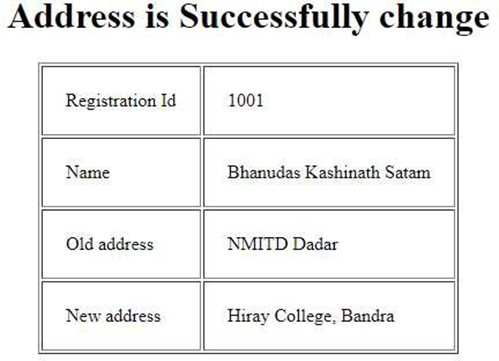
<h1 align="center">Address is Successfully change</h1>
<%
String regid=request.getParameter("txtRegid");
 String name=request.getParameter("txtName");
String oldadd=request.getParameter("txtOldaddress");
String newadd=request.getParameter("txtNewaddress");
out.println("<table border='1' align='center' cellpadding='20px' ");

out.println("<tr>"); out.println("<td>"); out.println("Registration Id"); out.println("</td>"); out.println("<td>"); out.println(regid);


out.println("</td>"); out.println("</tr>");

out.println("<tr>"); out.println("<td>"); out.println("Name"); out.println("</td>"); out.println("<td>"); out.println(name); out.println("</td>"); out.println("</tr>");

out.println("<tr>"); out.println("<td>"); out.println("Old address"); out.println("</td>"); out.println("<td>"); out.println(oldadd); out.println("</td>"); out.println("</tr>");

out.println("<tr>"); out.println("<td>"); out.println("New address"); out.println("</td>"); out.println("<td>"); out.println(newadd); out.println("</td>"); out.println("</tr>");

out.println("</table>");
%>
</body>
</html>
Output
Write a JSP program to add, delete and display the records from StudentMaste r(RollNo, Name, Semester, Course) table.
Write a JSP program that demonstrates the use of JSP declaration, scriptlet,directives, expression, header and footer.
Code :- index.jsp
<%--
Document : index
Created on : Mar 18, 2021, 8:10:33 AM Author	: VIKRAM
Write a JSP program that demonstrates the use of JSP declaration, scriptlet, directives, expression, header and footer.
--%>

<%@page contentType="text/html" pageEncoding="UTF-8"%>
<!DOCTYPE html>
<html>
<head>
<meta http-equiv="Content-Type" content="text/html; charset=UTF-8">
<title>Practical 6-6</title>
<style>
#content
{
margin-top:10px;
}
</style>
</head>
<body>

<!--use of Include Directives as header  -->
<%@include file="header.jsp" %>
<div id="content">
<!--JSP Declaration -->
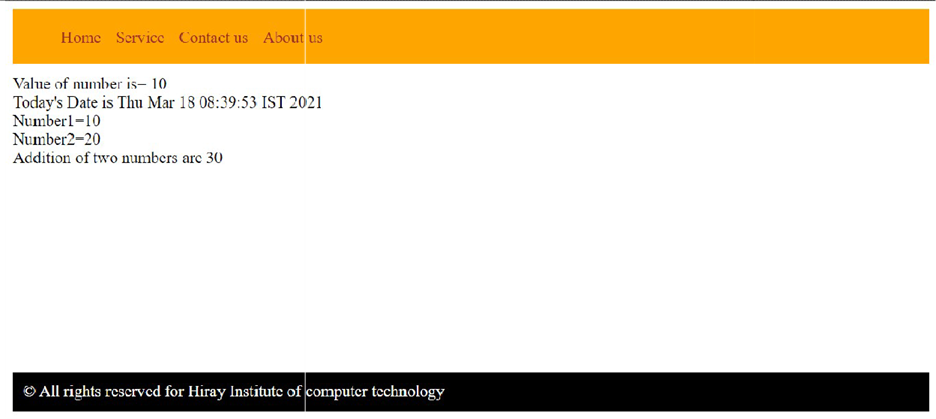
<%! int number1=10,number2=20;%> Value of number is= <%= number1%> <br>
<!-- use of JSP scriptlet -->
Today's Date is <% out.println(new java.util.Date()); %><br>
<!-- use of expression --> Number1=<%=number1%><br> Number2=<%=number2%><br>
Addition of two numbers are <%=number1+number2%><br>
</div>
<!--use of Include Directives as footer-->
<%@include file="footer.jsp" %>

</body>

</html>
Code :- header.jsp
<%--
Document : header
Created on : Mar 18, 2021, 8:24:06 AM Author	: VIKRAM
--%>

<%@page contentType="text/html" pageEncoding="UTF-8"%>
<!DOCTYPE html>
<html>
<head>
<meta http-equiv="Content-Type" content="text/html; charset=UTF-8">
<title>JSP Page</title>
<style>
#menu
{
background-color:orange; padding: 2px;
}
li
{
display:inline; padding:5px;

}
a
{
text-decoration: none; color:brown;
}
</style>
</head>
<body>
<div id="menu">
<ul>
<li> <a href="#">Home</a></li>
<li> <a href="#">Service</a></li>
<li> <a href="#">Contact us </a></li>
<li> <a href="#">About us</a></li>
</ul>
</div>
</body>
</html>
footer.jsp
<%-- Document : footer Created on : Mar 18, 2021, 8:16:07 AM Author : VIKRAM --%> <%@page contentType="text/html" pageEncoding="UTF-8"%> <!DOCTYPE html> <html> <head> <meta http-equiv="Content-Type" content="text/html; charset=UTF-8"> <title>JSP Page</title> <style> #foot { color:white; background-color: black; margin-top:200px; padding:10px; } </style> </head> <body> <div id="foot"> © All rights reserved for Hiray Institute of computer technology </div> </body> </html>
Output